"How to Use Our Federal Income Tax Calculator"
Table of contents
- The inputs, one at a time
- A worked run
- Why the result has three numbers
- Reading the breakdown
- The three mistakes that skew the answer
- What this calculator is for — and what it is not
- Three scenarios worth running before any money decision
- A second worked run: head of household
- Reading the result against your paycheck
- Questions people ask
- About these numbers
- Run the numbers
- How the result moves with income
- The same runs seen through after-tax income
- Where the total comes from
- Assumptions behind these figures
The Federal Income Tax Calculator returns an accurate 2026 estimate in well under a minute, but only if the four inputs are the four numbers it actually asks for. Most wrong results are not the tool being wrong — they are gross income entered where taxable income belongs, or last year's filing status carried into this year. This walkthrough covers each field, explains why the result is three numbers rather than one, and flags the errors that quietly skew the answer. For the theory behind the arithmetic, pair it with how federal tax brackets work in 2026 and the complete guide to U.S. federal income tax (2026).
The inputs, one at a time
Income. Enter your gross income — total pay before deductions. The calculator subtracts the standard deduction for you. Entering an already-reduced number double-counts the deduction and understates the tax. This is the single most common input error.
Filing status. Single, married filing jointly, married filing separately, or head of household. This is not cosmetic: it selects an entire bracket table and standard deduction. The 2026 standard deduction is $16,100 single, $32,200 married filing jointly, $16,100 married filing separately, $24,150 head of household. Choosing the wrong status can move the estimate by thousands.
Tax year. It defaults to 2026. The bracket thresholds and standard deduction are inflation-adjusted every year, so a 2025 return uses different numbers — confirm the year matches the return you are modeling.
Deduction type. The calculator applies the standard deduction by default. Override it only if your itemized total genuinely exceeds the standard amount; whether that is true for you is the entire question in standard vs itemized deductions.
A worked run
Single filer, $85,000 gross income, 2026, standard deduction:
| Step | Amount |
|---|---|
| Gross income | $85,000 |
| Standard deduction (single, 2026) | −$16,100 |
| Taxable income | $68,900 |
| 10% on first $12,400 | $1,240 |
| 12% on $12,400 – $50,400 | $4,560 |
| 22% on $50,400 – $68,900 | $4,070 |
| Total federal income tax | $9,870 |
The calculator returns that $9,870 and two more numbers most tools hide.
Why the result has three numbers
A single "tax owed" figure answers less than people think. The calculator deliberately shows three:
- Total tax — the dollars of federal income tax ($9,870 here).
- Marginal rate — the bracket your last dollar landed in (22%). This is the rate that prices a raise, a bonus, or a deduction.
- Effective rate — total tax ÷ income (about 11.6% on gross here). This is the share you actually paid.
Reading the 22% as your real rate is the classic error — it overstates the burden by nearly half here. Which number to use for which decision is the whole point of marginal vs effective tax rate explained. The calculator shows both so you never have to guess which one a result is quoting.
Reading the breakdown
The band-by-band table is the part worth studying, not skipping. It shows the progressive system working: the first $12,400 is taxed at 10% no matter how much you earn, only the slice above each threshold is taxed at the higher rate, and "moving into the 22% bracket" never retroactively taxes the dollars below it. Seeing the bands populate as you change the income input is the fastest way to internalize why a raise never makes you "lose money to taxes."
The three mistakes that skew the answer
- Entering net or taxable income as gross. The calculator deducts the standard deduction itself. Feed it a pre-deducted number and the result is too low.
- Wrong or stale filing status. A change in marital status, or filing as single when head of household applies, swaps the entire bracket table.
- Treating the estimate as a filed return. It models federal income tax on ordinary income. It does not include FICA or self-employment tax, state income tax, credits, the Alternative Minimum Tax, or the Net Investment Income Tax. It is a planning estimate, not a substitute for preparing the return.
What this calculator is for — and what it is not
Use it to test scenarios: what a $10,000 raise does, how filing jointly compares with separately, where the next bracket starts, how much a deduction is really worth. It is built for fast, accurate "what if" questions on federal income tax.
It is not a return. Self-employed? Layer in the Self-Employment Tax Calculator and read self-employment tax explained for 2026. Want the refund-or-owe picture including withholding? Use the Tax Refund Estimator. Need the state layer? That is the State Income Tax Calculator and the state income tax guide for all 50 states.
Three scenarios worth running before any money decision
The calculator earns its keep on "what if" questions, not on a single lookup. Three that change real decisions:
The raise. Enter your current gross, note the tax, then add the raise and re-run. The difference is the true cost of the new income — and it is taxed at your marginal rate, not your effective rate. A $10,000 raise for the $85,000 single filer above is taxed at 22%, so it nets about $7,800 federally. People who quote their effective rate here overestimate their take-home and under-save.
Filing jointly versus separately. Run the household both ways: combined income as married filing jointly, then each spouse separately as married filing separately. For most couples joint wins, but the calculator shows the gap in dollars rather than leaving it to folklore — and in specific cases (large unreimbursed medical expenses tied to one spouse, income-driven student loan repayment) separate can win.
The pre-tax contribution. Enter gross, then re-run with gross reduced by a planned traditional 401(k) or HSA contribution. The drop in tax is the contribution's immediate value at your marginal rate. Seeing "$6,000 contributed lowers tax by $1,320" is more persuasive than any general explanation, and it is the bridge to retirement account tax benefits.
A second worked run: head of household
Filing status changes more than a checkbox. Same $85,000 income, but head of household, 2026:
| Step | Single | Head of household |
|---|---|---|
| Gross income | $85,000 | $85,000 |
| Standard deduction (2026) | −$16,100 | −$24,150 |
| Taxable income | $68,900 | $60,850 |
| Total federal income tax | ≈ $9,870 | ≈ $8,033 |
Same paycheck, roughly $1,837 less federal tax purely from the larger head-of-household standard deduction and wider 12% band. This is exactly why entering the wrong status is the costliest input error — and why the calculator makes status a deliberate choice rather than a default.
Reading the result against your paycheck
A useful sanity check: the calculator's total tax divided by your number of pay periods is roughly what should be withheld per period for federal income tax alone. Compare that to the federal-income-tax line on a recent pay stub. If your withholding is running well above the calculator's per-period figure, you are heading toward a large refund — your own money parked with the Treasury. Well below, and you are heading toward a balance due. Either gap is a signal to revisit the W-4; the Tax Refund Estimator quantifies it directly, and how to adjust your W-4 for maximum take-home pay shows the fix.
Questions people ask
Should I enter income before or after my 401(k)? Use gross income, then reduce it by pre-tax retirement contributions yourself before entering — a traditional 401(k) lowers taxable wages, and modeling that reduction is one of the most useful things this tool does. The mechanics are in retirement account tax benefits.
Why is my number different from my paycheck withholding? Withholding is an estimate your employer makes from your W-4; this calculator computes the actual tax on the year's income. They are supposed to roughly meet at filing — the gap is your refund or balance due, which the Tax Refund Estimator shows directly.
Does it include Social Security and Medicare tax? No. Those are FICA, calculated separately. This tool is federal income tax only, so your total federal burden is higher than the figure shown.
Can I model itemized deductions? Yes — switch the deduction type and enter your itemized total. Only do so if it genuinely beats the standard deduction; standard vs itemized deductions explains when it does.
About these numbers
The 2026 brackets and the $16,100 / $32,200 / $16,100 / $24,150 standard deductions are projected values: the permanent statutory rate schedule with the IRS annual inflation adjustment applied, reconciled to the official IRS Revenue Procedure once published. Treat every result as a well-grounded planning estimate, not a filed figure, and confirm anything unusual with a CPA or Enrolled Agent who can see your whole return.
Run the numbers
Everything below came out of this site's own Federal Income Tax Calculator. The figures are not quoted from anywhere else: each row is one run of the same calculation the tool page performs, using August 2026 rules. Put the same inputs in and you will get the same output.
How the result moves with income
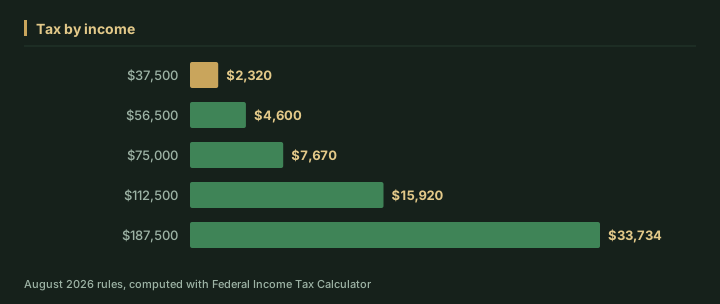
We ran 5 values of income through the calculator and left every other input at its default. As of August 2026, the output was:
| Income ($) | Tax ($) | After-tax income ($) | Taxable income ($) |
|---|---|---|---|
| 37,500 | 2,320 | 35,180 | 21,400 |
| 56,500 | 4,600 | 51,900 | 40,400 |
| 75,000 | 7,670 | 67,330 | 58,900 |
| 112,500 | 15,920 | 96,580 | 96,400 |
| 187,500 | 33,734 | 153,766 | 171,400 |
Running income from $37,500 up to $187,500 moves tax from $2,320 to $33,734 — a spread of $31,414. That gap is the part a single headline rate never shows.
The same runs seen through after-tax income
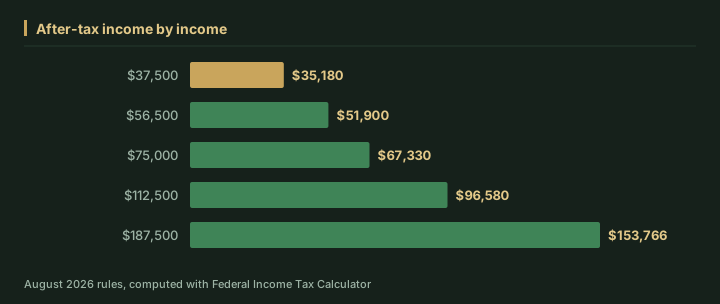
At $37,500, after-tax income works out to $35,180; at $187,500 it is $153,766. Looking only at tax tends to understate how much the outcome shifts across that range.
Where the total comes from
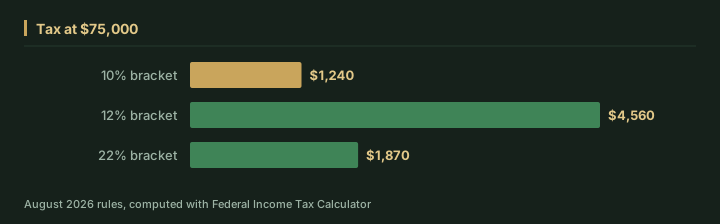
Holding income at $75,000, we ran the same calculation again and kept the breakdown it returns. The total is not one rate applied once — for the 2026 tax year it is built from 3 parts:
| Part | Tax |
|---|---|
| 10% bracket | $1,240 |
| 12% bracket | $4,560 |
| 22% bracket | $1,870 |
Assumptions behind these figures
| Input | Value |
|---|---|
| Income | $75,000 |
| Status | Single |
| Deduction type | Standard |
| Itemized | $0 |
| Year | 2026 |
| As of | August 2026 |
| Method | identical to /tools/federal-income-tax-calculator |
Brackets, thresholds and rates change from year to year, so treat these as August 2026 figures for the 2026 tax year. For your own situation, open the Federal Income Tax Calculator and enter your real numbers — the calculator runs the same code that produced every figure on this page.
Frequently Asked Questions
What information do I need to use a federal income tax calculator accurately?
You generally need your gross income, entered before any deductions since the calculator applies the standard deduction itself, your filing status, the tax year, and whether you plan to itemize or take the standard deduction. Entering an already-reduced income figure is one of the most common mistakes, since it effectively double-counts the deduction and understates your tax.
Why does a tax calculator show three different numbers instead of just one?
A good calculator typically shows total tax owed, your marginal rate (the rate on your last dollar of income), and your effective rate (total tax divided by income), because each number answers a different question. Relying on just the marginal rate as your real tax burden significantly overstates how much of your income actually goes to tax.
Does a federal income tax calculator include state taxes or self-employment tax?
Generally, no — a federal income tax calculator typically estimates only federal income tax on ordinary income and does not include FICA or self-employment tax, state income tax, the Alternative Minimum Tax, or the Net Investment Income Tax. It's meant as a planning estimate, and self-employed users usually need a separate calculator to layer in self-employment tax.
Try the related calculators
Related guides
"How to Determine Your Tax Bracket"
"\"I'm in the 24% bracket\" is almost always either wrong or misunderstood. Here is how to find the bracket yo...
"How to Estimate Your Tax Refund Before Filing"
A married couple expected a $3,000 refund and owed $1,900 instead. The number was knowable in October. Here is...
"How to Calculate State Income Tax for Your State"
"Federal tax is one rulebook. State income tax is up to 51 of them — flat, progressive, or none at all. Here i...